
DIY ELECTRONIC PERCUSSION · STEAM+C
Turn a bucket into a drum kit.
Students build drums from 5-gallon buckets, add a piezo sensor to each pad, and program a microcontroller that turns their hits into sound.
Talk with us · See how it works
1 drum — prototype in development
1 piezo — sensor per drum in the design
STEAM+C — in one project
Where BOM is today: a classroom prototype. This fall we’re talking with educators about how hands-on projects go in their classrooms.
THE PROTOTYPE
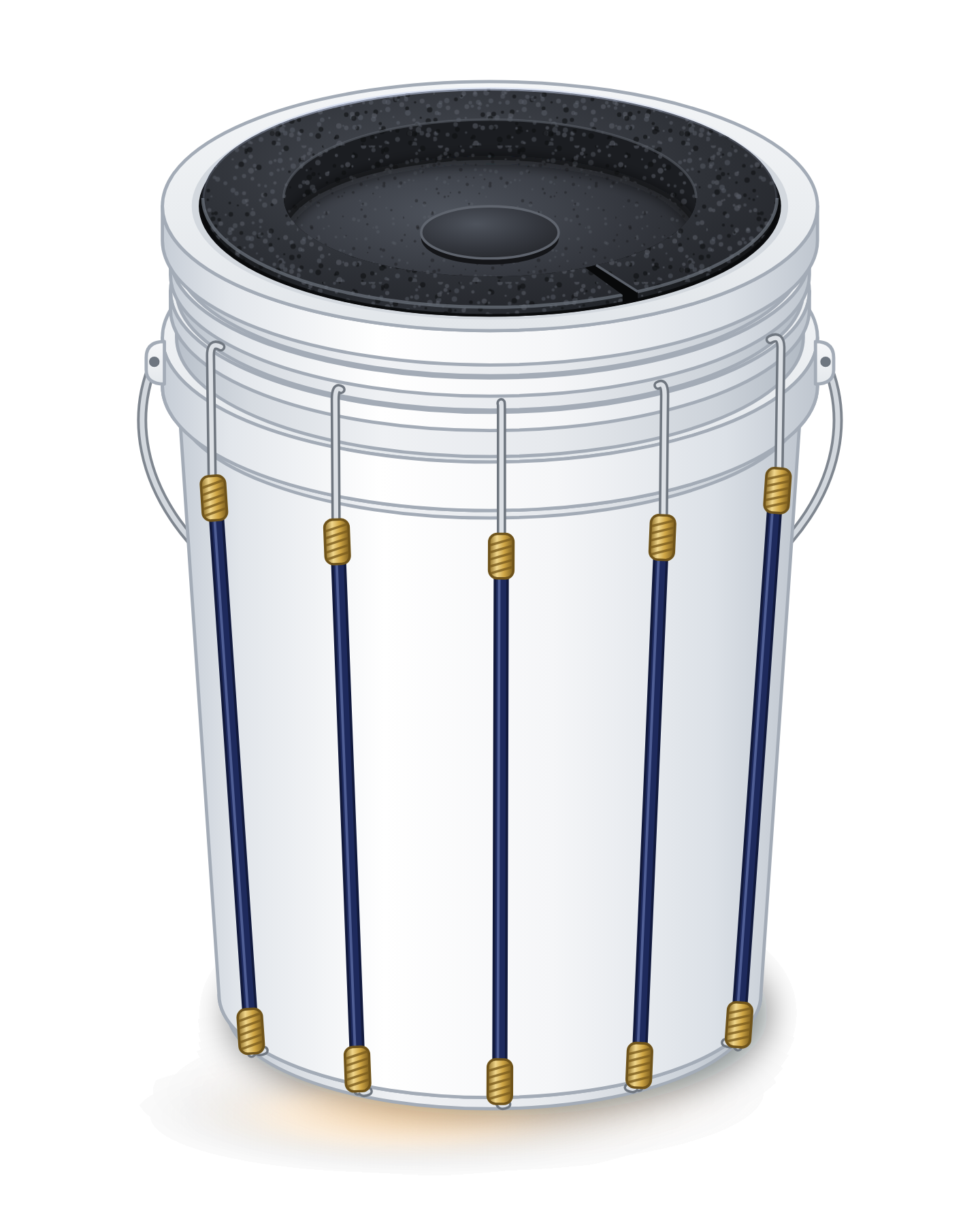
One drum from a 5-gallon bucket.
We are developing one bucket-drum prototype. Student builds may differ, creating opportunities to compare materials, tension and sound. Buckets can be customized with school logos, program branding, stickers and other designs to make each build your own.
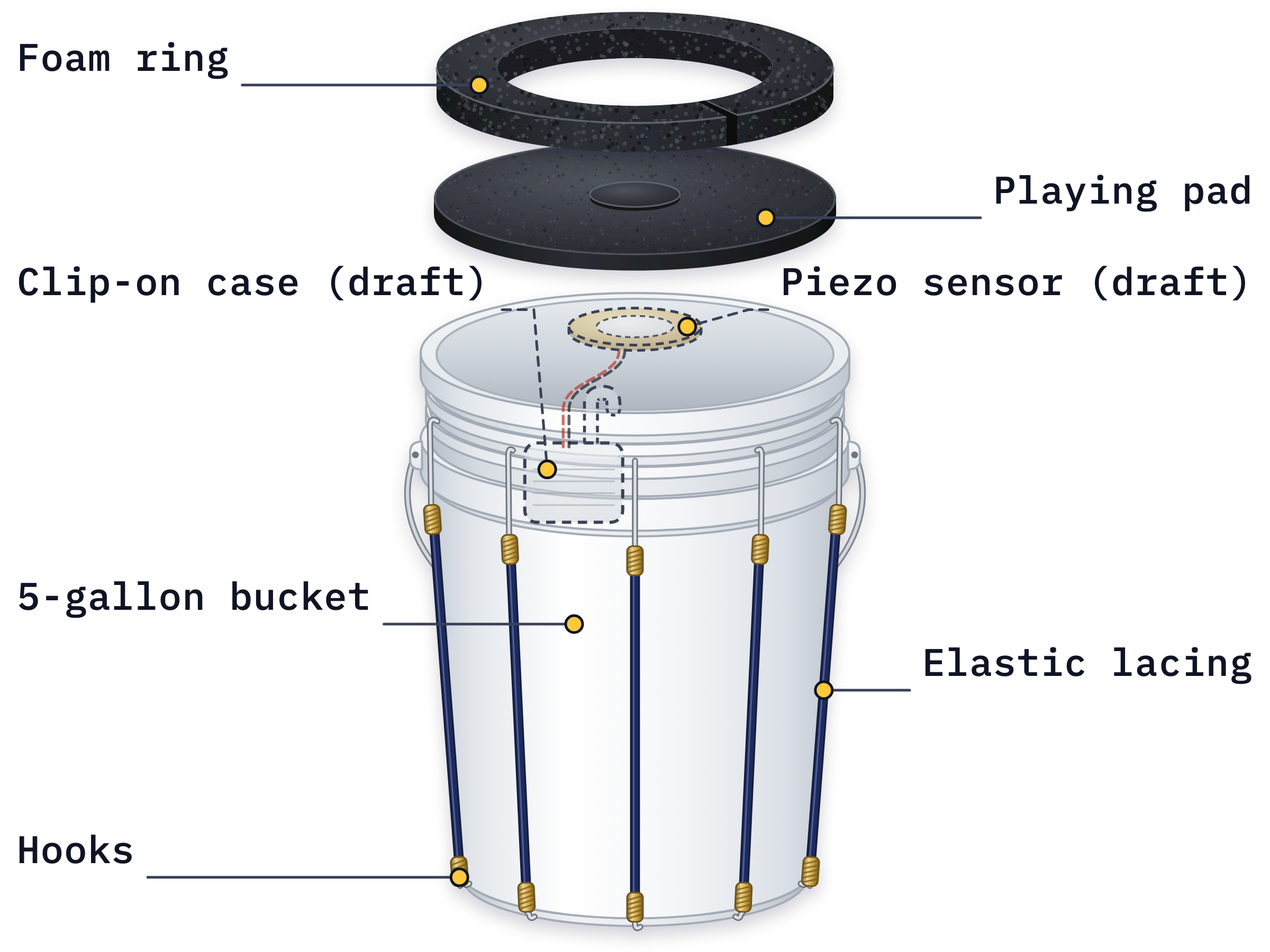
A BOM bucket drum in play. The drawing below shows the parts of one drum. Dashed parts are draft electronics we haven't built or tested yet.
HOW IT WORKS
From a hardware-store bucket to a drum students can play and program.
01 · BUILD
Build one drum
The prototype uses one 5-gallon bucket, a playing pad, a foam ring and elastic lacing.
02 · SENSE
Add a piezo sensor
A piezo disc turns each hit into a voltage. Three small parts keep that signal safe for the Pico. In our design we'd solder them onto a small board ahead of time, so students wouldn't need to.
03 · CODE
Program the Pico
A Raspberry Pi Pico reads the drum. Students would edit its code, a text file, to change how sensitive the drum is, how long it ignores the ringing, and which drum sound it sends.
04 · PLAY
Hear each hit
In our draft design, the drum would plug into a computer by USB as a MIDI drum pad, and free drum software would play kick, snare, hi-hat, tom or crash. We haven't built or tested it yet.
PROPOSED RESEARCH · ADAPTIVE SIGNAL CONDITIONING
Every bucket rings differently. Could the kit adjust?
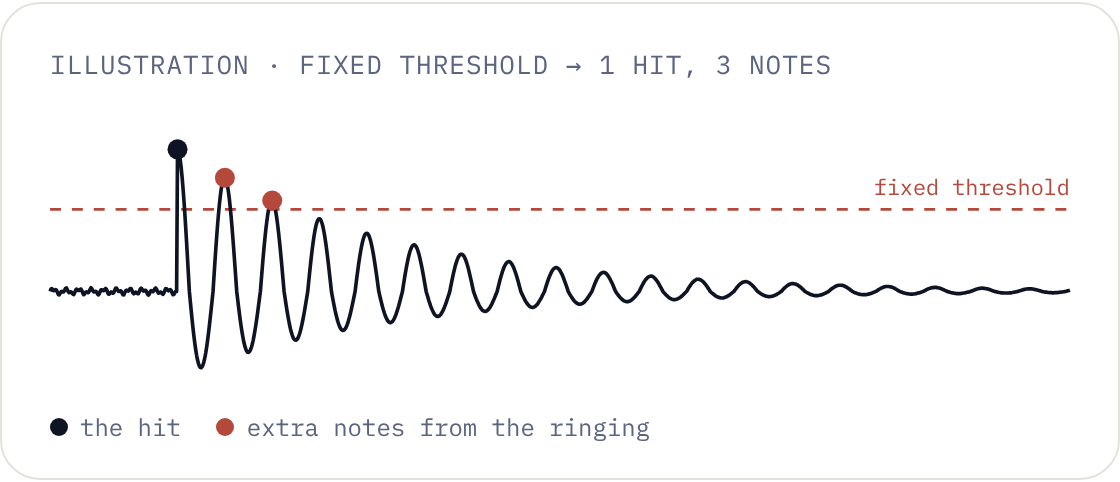
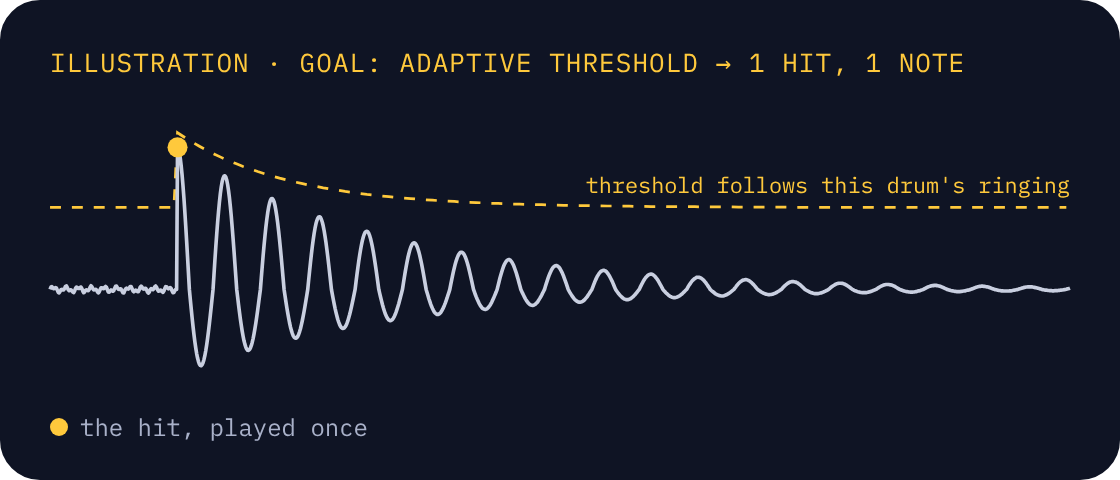
Student-built pads differ in size, material, foam and tension. A trigger setting that works on one drum can miss soft hits or play extra notes on another. Our research goal is firmware that measures how each pad responds and adjusts to it, so teachers don't have to hand-tune every student's drum.
Auto-calibration that would learn each pad's soft and hard hits
Noise filtering that would separate real hits from bumps and electrical noise
Crosstalk suppression that would keep one drum from triggering its neighbors without dropping real hits played together
Thresholds that would follow how each drum actually rings, instead of one preset setting for every drum
These are proposed research goals. None of them is working yet. Our untested draft code does something much simpler: when it starts, it reads the sensor for one second while the drum is still and sets its hit threshold just above that level. After that it follows simple preset rules.
Drawings of the idea, not measured data.
FOR CLASSROOMS AND MAKERSPACES
Hands-on music technology for every letter of STEAM+C.
CTE electronics and coding
Sensors, circuits and code in one project that ends with an instrument students can play.
Music and STEAM
Students build the instrument they perform on and connect rhythm to the physics of sound.
Makerspaces
A build from common materials that rewards testing and iteration.
Science · Technology · Engineering · Arts · Math · + Computing
PARTS LIST
Parts in our draft circuit
For one bucket drum. This is our current draft design. We haven't built or tested it yet, and it isn't a final parts list. A classroom kit may differ.
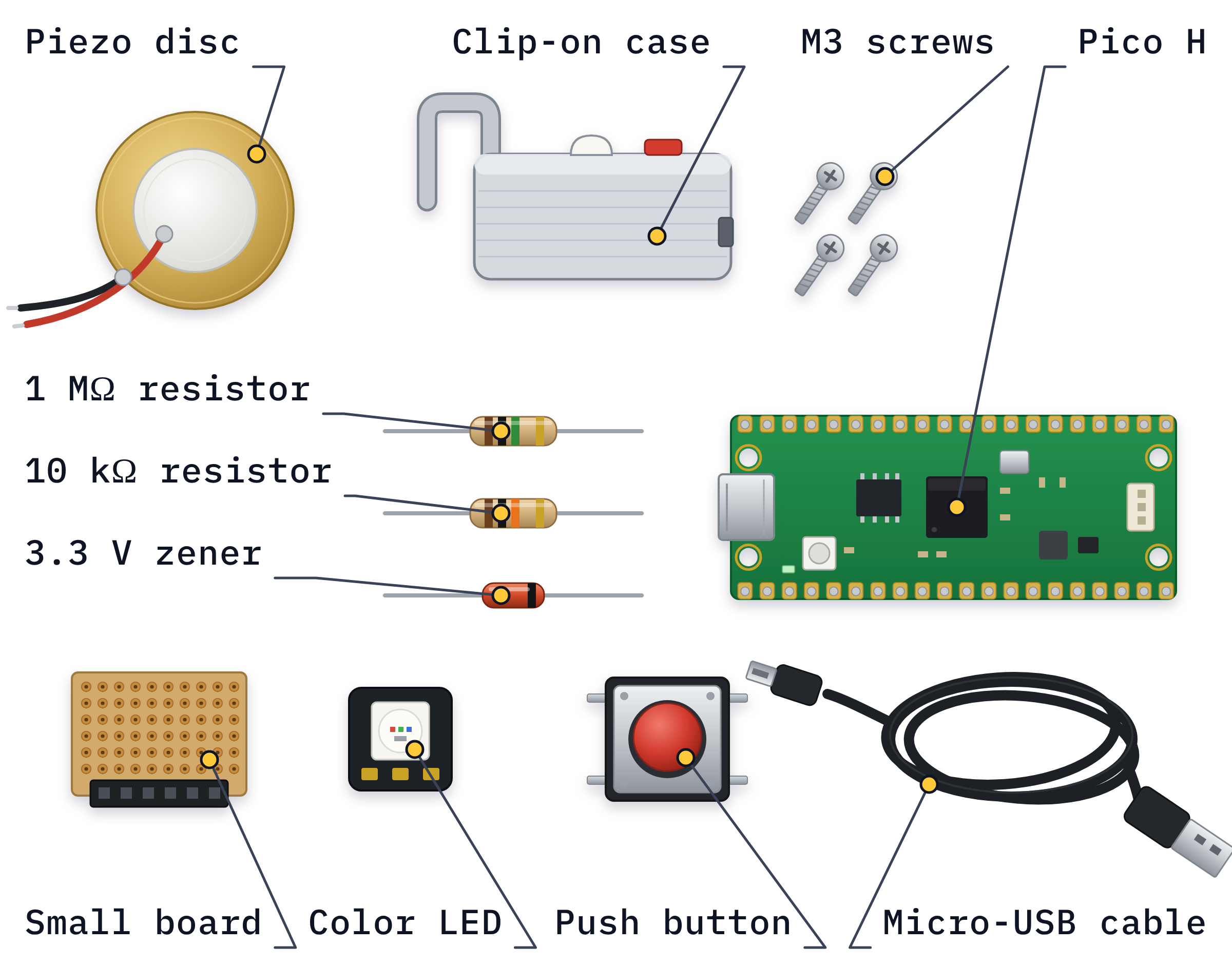
Illustration of the draft Smart Lid electronics (bucket and tape not shown). Parts may look different; the list gives quantities and roles.
Bucket, lid or playing pad, foam ring, elastic lacing — 1 set
Drum body and playing surfacePiezo disc with leads — 1
Senses each hit1 MΩ resistor — 1
Lets the signal settle between hits10 kΩ resistor — 1
Limits current into the Pico3.3 V zener diode — 1
Protects the Pico's input (piezo spikes can go over 3.3 V, even on ordinary hits)Small board for the three parts above, soldered by us ahead of time — 1
Plugs onto the Pico, so students wouldn't solderRaspberry Pi Pico H (pins already attached) — 1
Reads the drum and sends MIDI to the computerColor-changing LED (WS2812 "NeoPixel" type) — 1
Shows which drum sound is selectedPush button (momentary) — 1
Switches between drum soundsMicro-USB data cable, not charge-only — 1
Power, and MIDI to the computerClip-on case (3D-printed or a small plastic box) and 4 M3 screws — 1
Would hold the electronics and hook over the bucket rim, no drillingDouble-sided tape, foam tape, zip ties — 1 set
Hold the sensor and the cable in place
To make sound, the drum would also need a computer running free drum software (on a Chromebook, a drum web page in Chrome).
ABOUT
Who's building BOM
Beat On Me (BOM) Kit is associated with MIE Music Science and Technology. MIE is pronounced “me.” BOM brings instrument building together with electronics, coding, music, math and physics.
This fall, the BOM team is taking part in NJIT's I-Corps Propelus program, interviewing teachers and school leaders about hands-on learning before deciding what to build next.
Robert Rucker
Founder and Entrepreneurial Lead
A K–5 music teacher, a jazz drummer, and the founder of Music In Everything Corporation. Robert leads BOM's work with educators.
Jaykyun (Jay) Cho
Technical Lead
Hamilton Zhi
Co-Technical Lead

QUESTIONS
Questions educators ask
-
Not yet. BOM is a classroom prototype. We're talking with educators first to learn how hands-on projects run in schools.
-
We're exploring fit with K–5 music and STEAM classes, secondary CTE programs and makerspaces. Tell us about your students.
-
The prototype drum is a 5-gallon bucket with a playing pad, foam ring and elastic lacing. Our draft design adds a piezo sensor under the playing surface, wired to a Raspberry Pi Pico in a small case that clips over the rim. The drum would have no speaker of its own: it would plug into a computer by USB and play through free drum software (on a Chromebook, a drum web page in Chrome). After a one-time setup, students would change the drum's code by editing a text file on the Pico. We haven't built or tested this design yet.
-
We're not running pilots right now. If you'd like to tell us about your program, use the form below.
TALK WITH US
Tell us about your last hands-on classroom project
We’re speaking with CTE, electronics, coding, music/STEAM and makerspace educators—and the people involved in choosing classroom materials.
We want to understand how recent projects actually worked: preparation, equipment, troubleshooting and purchasing. You don’t need experience with Beat On Me.
Would you be open to a 30-minute conversation? Robert generally interviews after 4 p.m. Eastern.
Start here: Tell us about the most recent hands-on project you helped teach, organize or purchase. What worked well, and what was difficult?
We use what you send to reply to you and to learn how hands-on projects run in schools. Please leave out students' names. Privacy Policy · Terms of Use